> ## Documentation Index
> Fetch the complete documentation index at: https://3to1go.docs.thesteau.com/llms.txt
> Use this file to discover all available pages before exploring further.
# Snapshots
> Browse, download, and delete stored snapshots, and understand retention and integrity checks.
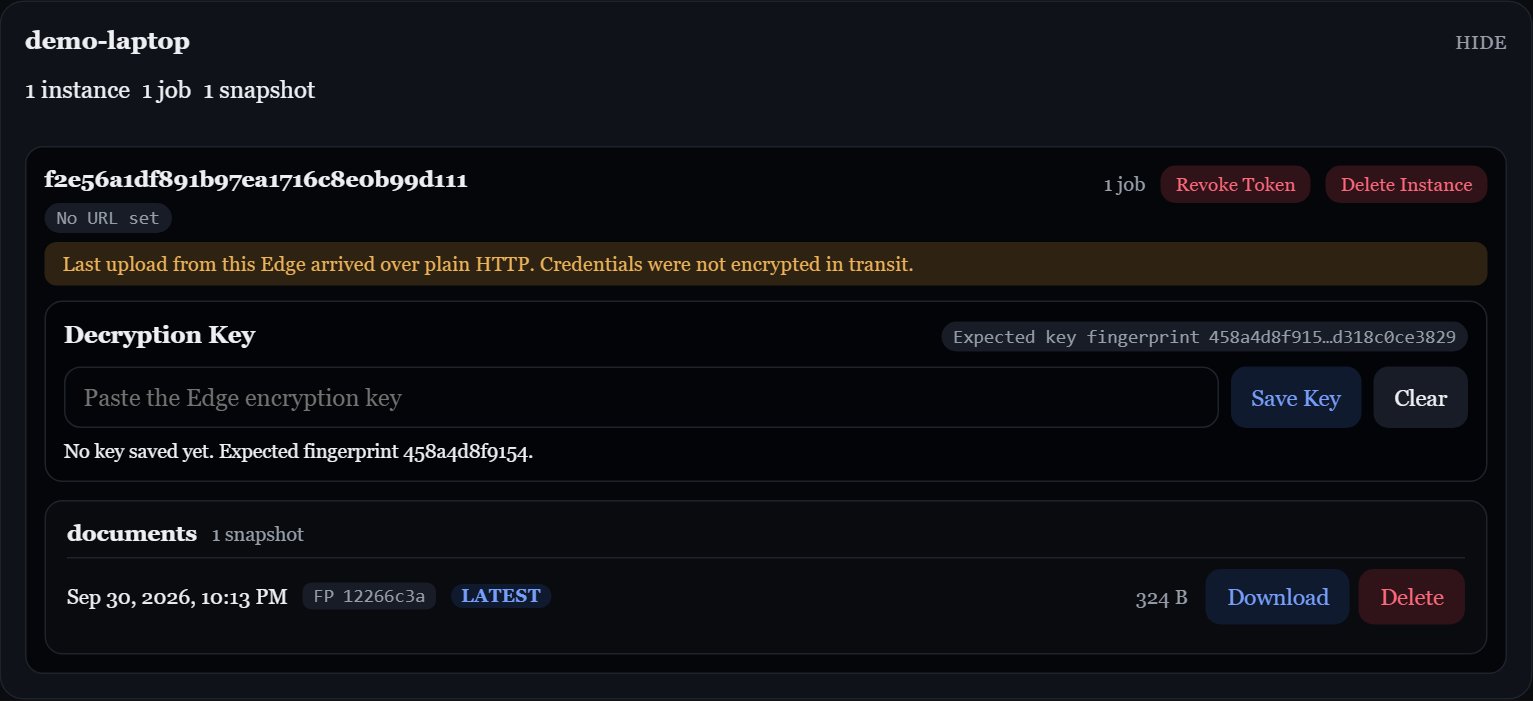
Central's main page, **Stored Snapshots**, lists every Edge, each of its instances, their jobs, and each job's snapshots. The newest snapshot of each job is tagged **latest**.
 ## How snapshots are stored
Each snapshot is one encrypted `tar.zst` file in Central's backup folder:
```text theme={null}
/backups////____.tar.zst
```
The fingerprint in the filename is the first eight characters of Edge's path-and-size fingerprint. You can use it to [restore a matching snapshot](/edge/restore#restore-a-specific-snapshot) from Edge, but multiple snapshots can share it.
## Download a snapshot
Click **Download** on a snapshot. Because snapshots are encrypted by Edge, Central's UI asks for that Edge's **encryption key** the first time:
Browser decryption uses Web Crypto. Open Central over HTTPS, or through `localhost` for local use; a plain HTTP LAN address does not provide the secure browser context needed for decryption.
In Edge's UI, find **Encryption Key** and click **Copy**. See [Encryption key](/edge/encryption-key).
Paste it when Central prompts. Central checks it against the key fingerprint that Edge reported, so a wrong key is caught before decryption starts.
The snapshot is decrypted in your browser as it downloads, and saved as a regular `tar.zst` archive.
The key is kept in that browser tab's memory and session storage, never sent to Central's server. **Clear** removes a saved key; signing out or returning to the sign-in dialog clears all saved keys in that tab, as does ending the tab session.
To extract the downloaded archive:
```sh theme={null}
tar --zstd -xf photos__2026-09-30T02-00-00Z__abcdef12.tar.zst
```
To put files back on the original machine, [restore from Edge](/edge/restore) instead. It downloads, decrypts, and extracts for you.
## Delete a snapshot
Click **Delete** on a snapshot and confirm. This permanently removes the file.
## Retention
After each upload, Central keeps the most recent **Keep Last Snapshots** (default `3`) for that job **and Edge instance**, and deletes older ones. Edge instances never prune each other's snapshots, even if they share an `EDGE_ID`.
Ordering uses the stored files' modification times. Preserve those times when copying archives back into Central's backup folder.
Change it in **Edit Central Settings**. See [Design decisions](/concepts/design-decisions#count-based-retention).
## Integrity checks
Central can re-check stored snapshots with SHA-256 to catch files that have been corrupted or changed on disk. Each check covers the **latest snapshot of every job**, not the full history, to stay lightweight.
* **Run Now**: start a check from the integrity bar on the snapshots page.
* **Scheduled**: set **Snapshot Integrity Check Interval** (hours) in **Edit Central Settings**. `0` turns scheduled checks off.
Central reads the check interval when it starts. After changing it, restart Central: `docker compose restart central`.
The bar shows the result of the most recent check and when it ran. Results are held in memory and reset when Central restarts. Snapshots without a recorded archive checksum are skipped. A successful check verifies the stored encrypted bytes, not whether you still have the correct decryption key.
## How snapshots are stored
Each snapshot is one encrypted `tar.zst` file in Central's backup folder:
```text theme={null}
/backups////____.tar.zst
```
The fingerprint in the filename is the first eight characters of Edge's path-and-size fingerprint. You can use it to [restore a matching snapshot](/edge/restore#restore-a-specific-snapshot) from Edge, but multiple snapshots can share it.
## Download a snapshot
Click **Download** on a snapshot. Because snapshots are encrypted by Edge, Central's UI asks for that Edge's **encryption key** the first time:
Browser decryption uses Web Crypto. Open Central over HTTPS, or through `localhost` for local use; a plain HTTP LAN address does not provide the secure browser context needed for decryption.
In Edge's UI, find **Encryption Key** and click **Copy**. See [Encryption key](/edge/encryption-key).
Paste it when Central prompts. Central checks it against the key fingerprint that Edge reported, so a wrong key is caught before decryption starts.
The snapshot is decrypted in your browser as it downloads, and saved as a regular `tar.zst` archive.
The key is kept in that browser tab's memory and session storage, never sent to Central's server. **Clear** removes a saved key; signing out or returning to the sign-in dialog clears all saved keys in that tab, as does ending the tab session.
To extract the downloaded archive:
```sh theme={null}
tar --zstd -xf photos__2026-09-30T02-00-00Z__abcdef12.tar.zst
```
To put files back on the original machine, [restore from Edge](/edge/restore) instead. It downloads, decrypts, and extracts for you.
## Delete a snapshot
Click **Delete** on a snapshot and confirm. This permanently removes the file.
## Retention
After each upload, Central keeps the most recent **Keep Last Snapshots** (default `3`) for that job **and Edge instance**, and deletes older ones. Edge instances never prune each other's snapshots, even if they share an `EDGE_ID`.
Ordering uses the stored files' modification times. Preserve those times when copying archives back into Central's backup folder.
Change it in **Edit Central Settings**. See [Design decisions](/concepts/design-decisions#count-based-retention).
## Integrity checks
Central can re-check stored snapshots with SHA-256 to catch files that have been corrupted or changed on disk. Each check covers the **latest snapshot of every job**, not the full history, to stay lightweight.
* **Run Now**: start a check from the integrity bar on the snapshots page.
* **Scheduled**: set **Snapshot Integrity Check Interval** (hours) in **Edit Central Settings**. `0` turns scheduled checks off.
Central reads the check interval when it starts. After changing it, restart Central: `docker compose restart central`.
The bar shows the result of the most recent check and when it ran. Results are held in memory and reset when Central restarts. Snapshots without a recorded archive checksum are skipped. A successful check verifies the stored encrypted bytes, not whether you still have the correct decryption key.